

How to Do Technical SEO: Beginner’s Guide (Step-by-Step)

Technical SEO is vital for optimizing your website, ensuring it meets the technical requirements of modern search engines for improved organic rankings and facilitating effective crawling and indexing of your content. To understand how to do technical SEO, you must optimize site structure, speed, mobile-friendliness, structured data, and site architecture, which are essential for search engines to efficiently access, interpret, and index your site. Prioritizing technical SEO is key for long-term success in search engine results pages (SERPs), making your content more accessible in the vast online space.
In this post, you’ll learn the fundamentals and how to do technical SEO with the best practice to optimize your website for search engines and the user.
Let’s get into it.
Understanding the Foundations of Technical SEO
Technical SEO refers to the process of optimizing the technical aspects of your website to improve its visibility in search engine results pages (SERPs). This includes optimizing your site’s infrastructure to enable search engines to crawl and index your content efficiently. Your efforts here are critical to making sure that your website meets search engine standards to be considered for ranking.
How to do Technical SEO
- Optimize Site Speed: A faster website provides a better user experience and is favored by search engines. You can optimize site speed by compressing images, leveraging browser caching, and reducing server response time.
- Ensure Mobile-Friendliness: With the increasing prevalence of mobile browsing, it’s crucial to have a responsive design. This means your site should automatically adjust to fit the screen of any device, providing a seamless experience for mobile users.
- Use Structured Data: Structured data helps search engines understand the content on your pages. Implementing schema markup can enhance your search results with rich snippets, which can improve click-through rates.
- Build a Logical Site Architecture: A well-organized site with a clear hierarchy makes it easier for search engines to crawl your website. This includes a logical navigation menu, a clear URL structure, and a sitemap.
- Improve Site Security with HTTPS: Secure your site with HTTPS encryption. This not only protects your users’ data but also contributes to your site’s credibility and search engine ranking.
- Optimize for Core Web Vitals: Focus on Google’s Core Web Vitals, which are metrics related to speed, responsiveness, and visual stability. Improving these can positively impact your site’s ranking.
- Fix Broken Links and Redirects: Regularly check for and repair broken links. Ensure that any redirects are properly implemented, as these can affect how search engines index your site.
- Enable XML Sitemaps: XML sitemaps help search engines discover your pages. It’s a way to tell search engines about the pages on your site that might not otherwise be discovered.
- Implement Canonical Tags: Use canonical tags to address duplicate content issues. This tells search engines which version of a page is the master copy and should be indexed.
- Improve Crawl Efficiency: Optimize your website’s crawl budget by preventing search engines from crawling irrelevant pages or parameters, ensuring that they spend more time on valuable content.
By implementing these technical SEO strategies, you can significantly improve your website’s performance in search engine results, ensuring an improved user experience and elevated search rankings. By the end, you will possess a comprehensive understanding of how to do technical SEO effectively.
If you want to know what are the types of SEO that exists, visit our guide.
Why Is Technical SEO Important?
Technical SEO is essential for your website’s success in search engine rankings. If your site’s pages are not accessible to search engines, they won’t show up in search results, regardless of how valuable the content is, leading to lost traffic and potential revenue. Additionally, site speed and mobile-friendliness are confirmed ranking factors. Slow-loading pages can frustrate users, causing them to leave, which signals a poor user experience to search engines and may result in lower rankings. To grasp technical SEO fully, it’s important to understand the processes of crawling and indexing.

Key Concepts: Crawl, Index, and Rank
- Crawl: This is the process where search engines use bots to systematically browse your website for content and code. Ensuring your site is crawlable is the first critical step in getting your pages into the index.
- Index: After crawling, search engines store and organize the content found in an index. If your pages are not indexable, they won’t be displayed in search results.
- Rank: Ranking is the process where indexed pages are ordered by relevance and quality in search results. Your site’s technical health affects ranking signals such as page speed, mobile-friendliness, and secure connections (HTTPS).
Remember, your main goal in technical SEO is to ensure that search engines can crawl, index, and serve your site to users efficiently. This foundational work is indispensable for succeeding in other SEO activities and achieving visibility in SERPs.
tHE rOLE OF sITE aRCHITECTURE AND nAVIGATION
A robust site structure and intuitive navigation are crucial for search engines to crawl and index your website efficiently. These elements also provide a foundation for a positive user experience by helping visitors find the content they’re looking for with ease.
Create a Simple Site Architecture
Your website’s architecture should reflect a clear hierarchy, making it straightforward for users and search engines to navigate. Think of your website as a library where each book is easy to find because of a logical organization system. Key components, such as header and footer menus, should thread throughout your site, connecting related content through internal links.
So, ensure all the pages are just a few clicks away from your homepage when structuring your site.
Optimizing URL Structure
An optimal URL structure is a cornerstone of effective technical SEO. URLs should be short, descriptive, and include relevant keywords without overloading. URLs like www.example.com/blog/optimizing-url-structure make it easier for users and search engines to comprehend your page’s topic. Well-structured URLs improve click-through rates and contribute to higher rankings.
Creating a Sitemap and Submit it to Google
An XML sitemap can help Google find your webpages. An XML sitemap is a file that lists the most significant pages on your website. It informs search engines about the pages you have and where to find them. This is especially critical if your website has many pages. Or if they are not properly linked.
If you want to create a sitemap, you can easily create one with RankMath SEO Plugin or Yoast SEO plugin.
And here is how the sitemap of Organixmedia.com looks like after creating it with Rank Math
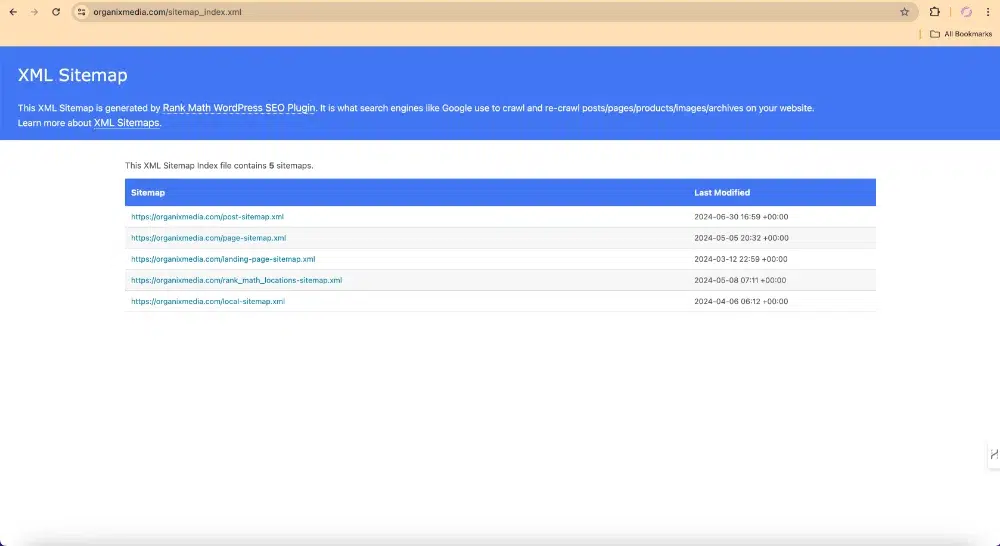
If you want to locate you sitemap, it’s easily accessible over these two links :
- yoursite.com/sitemap.xml
- yoursite.com/sitemap_index.xml
And if you believe your website architecture is good and your sitemap looks correct, you can submit it to Google Search Console using the following steps :
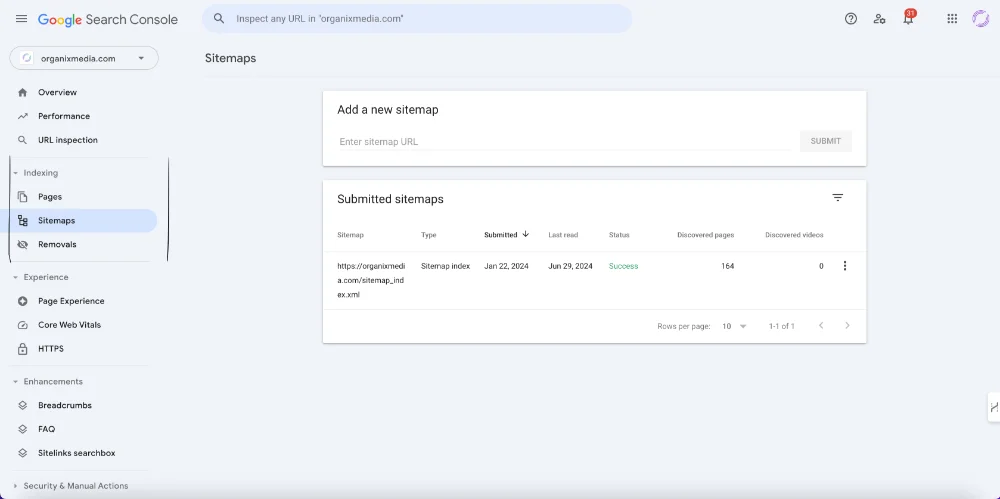
- Go to indexing section
- Click on Sitemaps Sections
- Paste the URL of your sitemap and submit
- Once it’s approved you will see the status as success
How Crawling and Indexing Work And How to Optimize Them
After search engines crawl your pages, they work to interpret and understand the content on them. This content is then stored in the search engine’s index, a vast database containing billions of web pages. For your pages to appear in search results, they must be indexed by search engines.
To check if you pages are indexed or not, follow these steps :
- 1. Go to Google Search Console
- 2. Go to Indexing Section
- 3. Click on Pages and check the indexing status of the pages
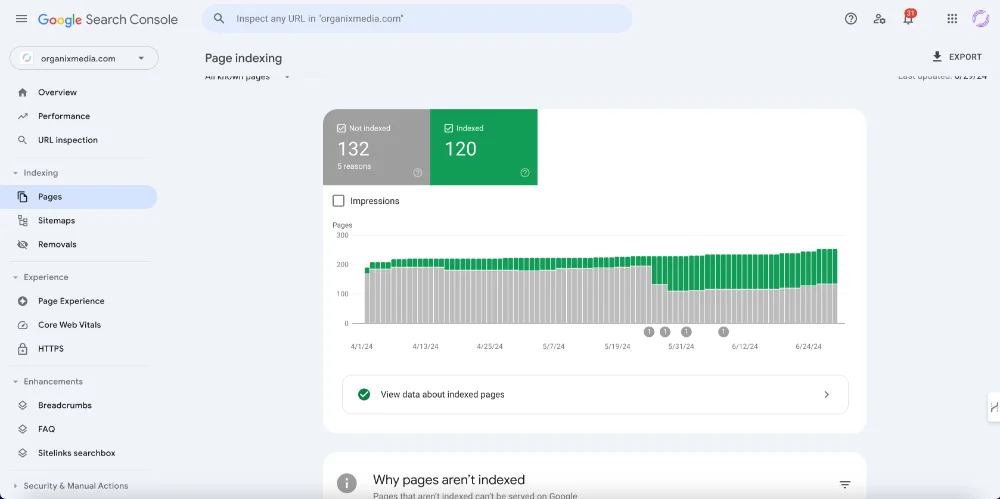
And below you can check the status of the pages that weren’t indexed and the reasons why they didn’t so you can fix them later on :

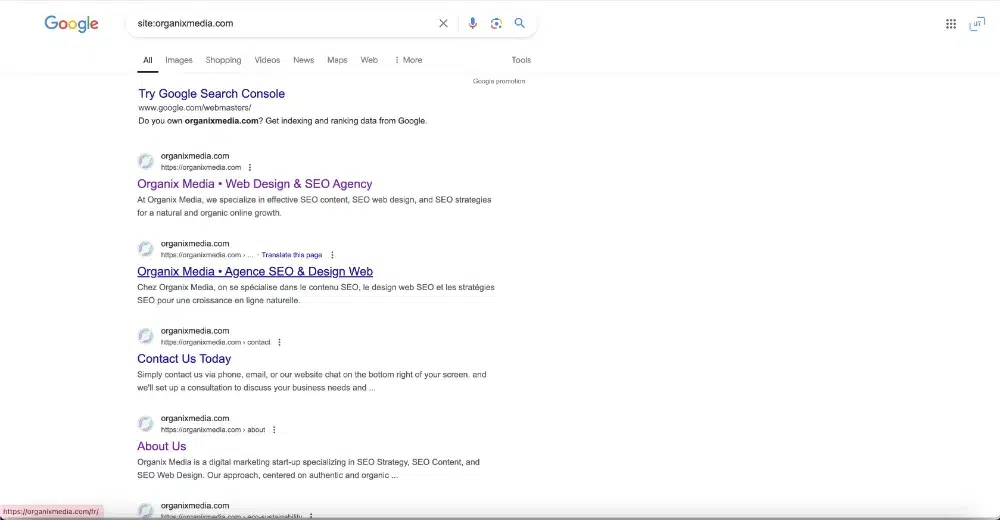
On the other hand, the easiest method to verify if your pages are indexed is by using the “site:” operator in a search. For instance, to check the index status of organix.com, you would type “site:organixmedia.com” into Google’s search bar. This will give you an approximate count of how many pages from the site Google has indexed.
Use Noindex Tag for Unimportant Pages
Using the noindex tag for unimportant pages helps prevent search engines from indexing content that doesn’t add value to your SEO efforts. This can include pages like login screens, privacy policies, or duplicate content. By focusing search engines on your most valuable pages, you can improve overall site performance and rankings.
Here are the steps to add a noindex tag to unimportant pages:
- Access Your Website’s HTML or CMS
- Locate the Page to Be Noindexed
- Edit the Page’s HTML Head Section
- Add the Noindex Meta Tag: <meta name=”robots” content=”noindex”>
- Save and Publish
If you find it really confusing and hard to implement, we can guide you through this process and take the mission instead
Need a Digital Solution?
Get in contact now with Experts!
We answer calls 24/7!
Optimizing Website Performance and Accessibility
Optimizing your website’s performance and accessibility is pivotal for better search engine rankings and user experience. Fast loading times, responsive design, and secure connections are critical components of a technically optimized website.
Improving Page Speed
Page speed is crucial for better search engine rankings as it enhances user experience and reduces bounce rates. Faster-loading pages are favored by search engines, leading to higher rankings. Here are some steps and tips to optimize your site speed:
- Compress Images: Reduce the file size of images without compromising quality to improve load times.
- Minimize CSS, JavaScript, and HTML: Remove unnecessary characters and spaces to streamline your code.
- Enable Browser Caching: Store static files locally in the user’s browser to speed up repeated visits.
- Use a Content Delivery Network (CDN): Distribute your content across multiple servers to reduce load times for users around the world.
- Optimize Server Response Time: Improve your server performance to handle requests more efficiently.
- Regularly Review Core Web Vitals: Use Google Search Console to monitor your site’s loading performance and make necessary adjustments.
To check your site speed visit this page speed insights test by google
Ensuring Mobile-Friendliness
Mobile friendliness refers to how well your website performs on mobile devices, and it’s crucial in today’s mobile-first world. A mobile-friendly design ensures your site adjusts to different screen sizes, enhancing usability and boosting your mobile SEO efforts, as Google prioritizes mobile-friendly pages. Here are steps and tips to optimize your site for mobile devices:
- Utilize Responsive Design: Ensure your website adjusts seamlessly to various screen sizes and orientations.
- Simplify Navigation: Make menus and buttons easily accessible and navigable on smaller screens.
- Optimize Images: Use appropriately sized images to improve loading times on mobile devices.
- Improve Load Times: Compress files and utilize caching to enhance performance on mobile networks.
- Test Mobile Responsiveness: Use Google’s Mobile-Friendly Test tool to check and improve your website’s mobile compatibility.
- Prioritize Readability: Use legible fonts and sizes, and ensure sufficient contrast for text on mobile screens.
- Avoid Flash: Use HTML5 instead, as Flash is not supported on many mobile devices.
Implementing SSL/HTTPS
Securing your website with SSL (Secure Sockets Layer) will encrypt data exchanged between the user and the site, converting your site to HTTPS. This layer of security is important for user trust and is also a ranking signal for search engines. Ensure all your web pages are served over HTTPS to avoid warnings about insecure content.
Once your website has transitioned to HTTPS, make sure to include redirects from HTTP to HTTPS. This will redirect all HTTP users to the secure HTTPS version of your site.
Leveraging Structured Data and Schema Markup
To effectively enhance your website’s visibility and clarify its content to search engines, implementing structured data and Schema markup is impoortant. These define more precisely what your data means, enabling search engines to index your site more effectively.

Implement Structured Data
Structured data refers to a standardized format for providing information about a page and classifying the page content.
For example, if you’re listing an event on your website, structured data can help communicate the details of that event, such as location, date, and time, to search engines in a way they understand. The most common format of structured data on the web is JSON-LD, which is recommended by Google for its simplicity and ease of implementation.
The benefit of rich snippets is that they make your pages stand out from others. Which can improve your click-through rate (CTR).
Find the structure data that google support in this link , so choose one that best fits the nature of the pages you want to add structured data to.
Benefits of Schema Markup
Schema markup is one of the forms of structured data that works with several search engines including Google, Bing, Yahoo, and Yandex. Implementing Schema markup on your website can improve the way your page displays in SERPs by enhancing the rich snippets that are displayed beneath the page title. For instance, if your web page has breadcrumbs, adding Schema markup enables this navigational aid to appear in your search result, thus improving user experience even before they click on your website. Here are precise benefits:
- Enhanced visibility: Rich snippets can lead to better click-through rates.
- Improved SEO: Search engines reward sites that are user-friendly and informative with higher rankings.
By integrating structured data markup, you’re setting up your site for more successful interactions with search engines, potentially leading to increased traffic and engagement.
Use Breadcrumb Navigation
Breadcrumb navigation, or “breadcrumbs,” is a series of text links that indicate a user’s current location on a website and how they arrived there. These links streamline navigation.

Why is it important?
Breadcrumbs allow users to navigate to higher-level pages easily, enhancing usability and user experience, especially on large sites like e-commerce platforms. They also improve SEO by distributing link equity (PageRank) across your site, boosting search engine rankings. For WordPress or Shopify sites, breadcrumbs are easy to implement using built-in theme features or plugins like RankMath SEO.
Improving User Experience and Content Quality
In the realm of how to do technical SEO, your primary focus should center on enhancing the user experience and the quality of your content. These two components are instrumental in search engine rankings and ensuring that your users remain engaged with your site.
Prioritizing User Experience (UX)
UX and SEO or what is known by user experience (UX) involves every interaction a visitor has with your website. To bolster your UX, ensure that your site’s navigation is intuitive and your design is responsive. Utilize CSS and JavaScript to create a seamless interface without sacrificing loading times. Remember, search engines like Google place a high value on user experience metrics, which means every second counts. Optimize your images and employ a content distribution network (CDN) to speed up page delivery across various geolocations.
- Use CSS to provide visual appeal without clutter.
- Optimize JavaScript execution for faster page responsiveness.
- Implement a CDN for improved content delivery speeds.
Content Optimization Strategies
For content optimization, your strategies must ensure that your content is not only relevant but also authoritative and informative. Start with a thorough keyword analysis to understand what your audience is searching for, and create content that aligns with those queries. Incorporate a sensible hierarchy in your content structure using HTML header tags, and enhance readability with bullet points and tables where appropriate. Usability tests can guide you in fine-tuning your content to meet user expectations and improve engagement.
- Create content that is comprehensive and aligns with user search intent.
- Structure your content with header tags and lists for better readability.
- Regularly update your content to keep it fresh and relevant.
Use Hreflang for Content in Multiple Languages
Hreflang tags are essential for websites offering content in multiple languages, ensuring that users see the correct version of your site based on their language and region. These tags help search engines understand the relationship between different language versions of your pages, improving user experience and SEO.
For example, we have multiple versions of our homepage in different languages. This is our homepage in English:

And this is our Homepage in French

Each version of our site employs hreflang tags to indicate to Google the target audience for that specific content.
Implementing these tags is quite straightforward.
Simply insert the relevant hreflang tags in the <head> section of every version of the page.
For instance, if your homepage is available in English and French, you would include these hreflang tags on each of those pages:
<link rel=”alternate” hreflang=”x-default” href=”https://yourwebsite.com” />
<link rel=”alternate” hreflang=”fre” href=”https://yourwebsite.com/fr/” />
<link rel=”alternate” hreflang=”en” href=”https://yourwebsite.com” />
Advanced Technical Optimization Techniques
Mastering advanced technical optimization techniques is essential for enhancing your website’s performance in search engine rankings, a crucial aspect of learning how to do technical SEO. While understanding what does off-page SEO include broadens your SEO strategy beyond your website, addressing on-site concerns such as duplicate content and performing regular SEO audits is vital. These steps ensure your site is efficiently crawled and indexed, which are key aspects of technical SEO.
Handling Duplicate Content Issues
Duplicate content can severely impact your site’s SEO content writing performance. To tackle this, you should employ canonicalization. This means using canonical tags (<link rel="canonical" href="example.com" />) to tell search engines which version of a page is the master copy. Always ensure your robots.txt file is up-to-date and structured correctly, as it guides search engines to the content you want to be indexed while keeping duplicate pages out of search results.
- Use
<link rel="canonical" href="your-preferred-url" />in the head section of similar or duplicate pages. - Configure your robots.txt file to prevent search engines from accessing and indexing duplicate content portions of your website.
Website Audits and Continuous Monitoring
Performing a thorough technical SEO audit is crucial for identifying issues that could be holding your site back. Start by crawling your site with tools designed specifically for site audits, being attentive to redirects, broken links, and JavaScript rendering issues.
- Conduct a site audit to assess site health: Check for broken links, evaluate robots.txt, and review canonical tags. You can use Semrush Site Audit tool to conduct this technical SEO step.
- Monitor your site continuously with automated tools to identify and rectify issues promptly.
By implementing these advanced methods, you improve your site’s integrity and boost its presence on the web.

Find And Fix Broken Links
Identifying and fixing broken pages on your website is crucial for maintaining a positive user experience and improving SEO. Broken pages, often resulting in “404 Not Found” errors, can frustrate users and negatively impact your search engine rankings especially of those links have backlinks.
How to Find Broken Pages:
- Use Tools: Utilize tools like Google Search Console, Screaming Frog, or Ahrefs to scan your website for broken links and pages.
- Monitor Analytics: Regularly check your website analytics for pages with high bounce rates, which can indicate broken links.
How to Fix Broken Pages:
- Redirects: Set up 301 redirects to guide users from the broken page to a relevant, active page on your site.
- Update Links: Correct or update any internal links pointing to the broken page.
- Create Custom 404 Pages: Design a user-friendly 404 page that helps users find what they’re looking for, such as including search functionality or popular links.
Example:
Suppose you have an e-commerce site and discover through Google Search Console that the product page for a popular item, www.example.com/product123, is broken.
- Redirect: Create a 301 redirect from
www.example.com/product123to the new product URLwww.example.com/new-product123. - Update Links: Go through your site’s internal links and update any that point to the old URL.
- Custom 404 Page: Ensure that if any user lands on a broken page, they see a helpful 404 page with a search bar and links to popular products.
By promptly finding and fixing broken pages, you can ensure a smoother user experience and maintain strong SEO performance.
Tools to find and fix broken links :
Core Web Vitals
Core Web Vitals are a set of metrics that Google considers essential for a healthy website, impacting both user experience and SEO rankings. These metrics focus on loading performance, interactivity, and visual stability of your site.
Key Metrics:
- Largest Contentful Paint (LCP): Measures loading performance. An ideal LCP is 2.5 seconds or faster.
- First Input Delay (FID): Measures interactivity. An ideal FID is less than 100 milliseconds.
- Cumulative Layout Shift (CLS): Measures visual stability. An ideal CLS score is less than 0.1.
How to Improve Core Web Vitals:
- Optimize Images: Compress and properly size images to improve loading times.
- Minimize JavaScript: Reduce the amount of JavaScript to improve interactivity.
- Use Efficient CSS: Ensure CSS is streamlined and only essential styles are loaded.
- Implement Lazy Loading: Load images and content as they are needed to improve performance.
- Use a Content Delivery Network (CDN): Distribute content across various servers to reduce load times.
Maintaining Crawl Efficiency
Effectively managing your website’s crawl efficiency is crucial for ensuring that search engine spiders allocate their resources wisely, scanning your most important content without wasting time on irrelevant pages.
Optimizing Crawl Budget
Your crawl budget is the number of pages a search engine spider will crawl on your site within a given timeframe. To optimize this, ensure that your website’s most vital and updated content is accessible to crawlers. Robots directives can be used to tell crawlers which pages are important. You should also create and maintain an XML sitemap, as this provides a roadmap for search engines to follow, pointing them towards the pages you consider most important.
Quick Tips:
- Regularly update your XML sitemap and submit it to search engines to reflect new or updated content.
- Use
nofollowlinks sparingly to prevent waste of crawl budget on unimportant links.
Managing Robots.txt File
The robots.txt file is your first line of defense when directing the flow of crawlers across your site. With the correct robots directives, you dictate which areas of your site crawlers should avoid. This can prevent search engine spiders from accessing duplicate pages, certain archives, or user-specific information, thereby saving your crawl budget for the content that truly matters.
Do:
- Disallow:
/unimportant-directory/in your robots.txt to block crawlers from irrelevant sections.
Don’t:
- Disallow:
/which would block all crawlers from accessing your entire site.
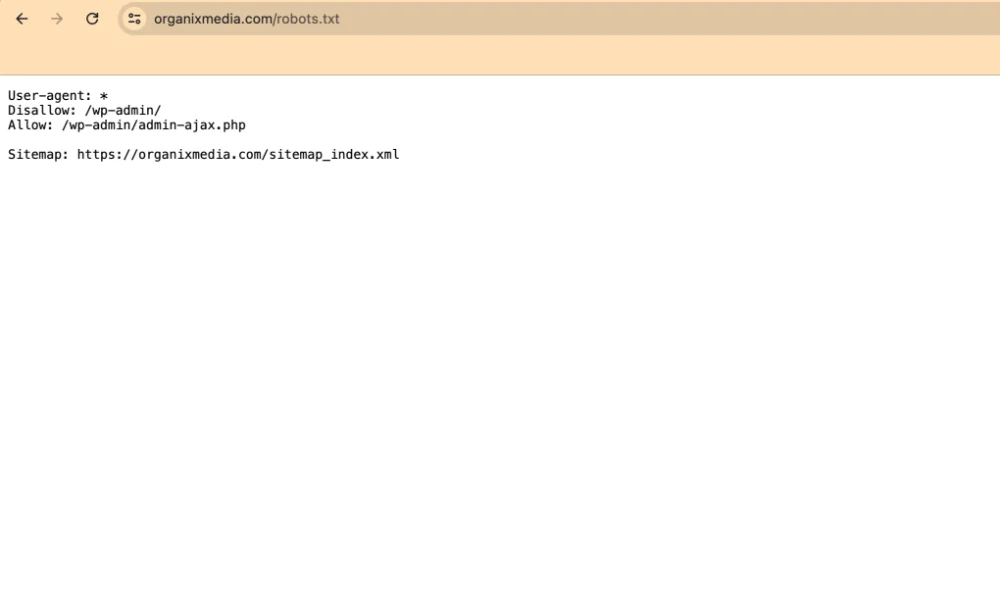
Your robots.txt file is available at your homepage URL with “/robots.txt” at the end.
Here’s an example: yoursite.com/robots.txt
Check it to ensure you’re not accidentally blocking access to important pages that Google should crawl via the disallow directive.
Interlinking and External Link Management
In the realm of how to do technical SEO, interlinking and managing external links are foundational strategies that influence how search engines understand and value your website. Careful orchestration of your internal links can reinforce site architecture, while strategic backlink acquisition can elevate your site’s credibility.
Effective Internal Linking Strategies
To fortify your site’s structure and enhance user navigation, you should create a web of internal links that connect your pages logically. Begin by developing a sitemap to ensure every page has a purpose and is accessible. Use descriptive anchor text that signals the content of the target page. Prioritize linking to important pages to distribute page authority effectively and prevent creating orphan pages that stand isolated from your site’s internal link structure.
Here is an example of what can be a good strategy of internal linking :

Canonical URLs and Redirects
When you have duplicate content or have restructured your site, canonical URLs help you tell search engines which version of a page is the master copy.
Use the <link rel="canonical" href="example.com"/> tag to consolidate link signals and avoid diluting your ranking ability. If pages are moved or deleted, ensure to set up 301 redirects to guide users and search engines to the appropriate content without losing the SEO value accumulated by the original page.
Strategic Use of Backlinks
Backlinks, or external links from other sites, act as a vote of confidence in your content’s quality. Strive to gain backlinks from reputable sources within your field to signal trustworthiness and authority to search engines. Analyze your backlink profile regularly and aim for a healthy mix of linking root domains and a variety of link types including text, images, or citations. Be mindful of the link context and the relevancy to your industry to maximize the benefits of your backlinks.
After all of this, i am sure that you know how to do technical SEO and surely you will help search engine crawl, index and rank your website seamlessly.
Frequently Asked Questions
Before diving into how to do technical SEO, it’s important to understand its various components and how they contribute to your website’s overall performance in search results.
What are the essential elements of Technical SEO?
Technical SEO consists of optimizing the infrastructure of your website so that search engines can crawl and index your content efficiently. Key elements include a well-structured site architecture, optimized robots.txt files, and a comprehensive XML sitemap.
What are the key SEO techniques that can improve a website’s search engine visibility?
Improving a website’s visibility involves a suite of techniques: ensuring fast loading speeds, making your website mobile-friendly, implementing secure sockets layer (SSL) security, and improving canonical URLs to avoid duplicate content.
How can one conduct a thorough Technical SEO audit for a website?
To conduct an audit, you should analyze your website’s crawlability, inspect site structure for broken links, evaluate page depth, review your robots.txt for disallow directives, and use tools to identify issues affecting site performance. Books like “Search Engine Optimization (SEO): An Hour a Day” offer practical guidance on these topics.
In what ways does Technical SEO differ from On-page SEO, and how are they interconnected?
Technical SEO is about the infrastructure, ensuring that search engines can access and interpret your site efficiently. In contrast, On-page SEO focuses on content and optimization within the pages, like keywords and meta tags. Both are crucial and work in tandem for a fully optimized site.
What are some practical examples of Technical SEO at work?
Examples of Technical SEO include setting up 301 redirects for broken links, optimizing your website’s load time, using structuring data markup to enhance search results, and optimizing your server to handle crawl requests effectively.
How can beginners effectively learn and apply Technical SEO principles?
Beginners can learn Technical SEO by reading authoritative SEO guides, following industry experts, and using SEO tools to practice auditing and optimizing a website. Resources like “The Art of SEO” offer in-depth knowledge on advanced tactics in a straightforward manner.
Conclusion
Mastering how to do technical SEO is essential for any website looking to improve its visibility and ranking in search engine results. By addressing key aspects such as site speed, mobile-friendliness, structured data, and a well-structured site architecture, you lay a solid foundation for your website’s success. Remember, technical SEO is not a one-time task but an ongoing process, and staying updated with the latest trends and practices in how to do technical SEO is crucial for maintaining and enhancing your website’s performance in the ever-evolving digital landscape.
Need a Digital Solution?
Get in contact now with Experts!
We answer calls 24/7!


